Multiple Nursing or Medical Jobs: Per-Job Award Tracking
Part-time hospital plus agency, bank, or locum work means multiple awards, multiple pay periods, and multiple penalty rate schedules. How to track each one correctly.
Many nurses and doctors in Australia work more than one job simultaneously. A registered nurse might work part-time at a public hospital under the Nurses Award and pick up additional shifts through a staffing pool, bank, or nursing agency. A junior doctor might combine a hospital contract with locum sessions or casual work at a private practice. Each arrangement has its own award, enterprise agreement, classification, and penalty rate structure.
Most shift-tracking apps are built for a single employer. When you work multiple jobs, that assumption breaks immediately.
Why multiple jobs means multiple award calculations
A typical multi-job setup for a nurse might look like this:
- Hospital (direct employment): Public Health System Nurses and Midwives Award (MA000034), Level 2 Year 3, fortnightly pay period, weekend and night shift penalties apply, overtime at 150% then 200%.
- Staffing pool or bank: Different enterprise agreement or casual rates, possibly at a different level and year, different overtime rules, weekly pay period.
- Agency: Could be under a different award entirely, or at a flat casual rate negotiated directly, no overtime structure.
Each of these has its own penalty rate schedule. Saturday rates differ between awards. Night shift loadings are defined differently. Overtime thresholds may be calculated across different time periods. If you track all three jobs in a single-employer app, you either can’t apply the right rules to each one, or you’re manually working out the differences yourself.
The same problem for junior doctors
Junior doctors increasingly combine a hospital contract with locum or casual work. The hospital contract might be under a state Doctors in Training agreement (AMA Victoria, NT DIT, SA SMOEA) with its own penalty rates, minimum engagement, and overtime averaging. Locum sessions might be billed at a flat session rate under a separate arrangement. Casual shifts at a private hospital or clinic may operate under different rules again.
Tracking these alongside each other — and checking that each is being paid correctly — requires maintaining separate records for each employment stream.
How Shift It handles multiple jobs
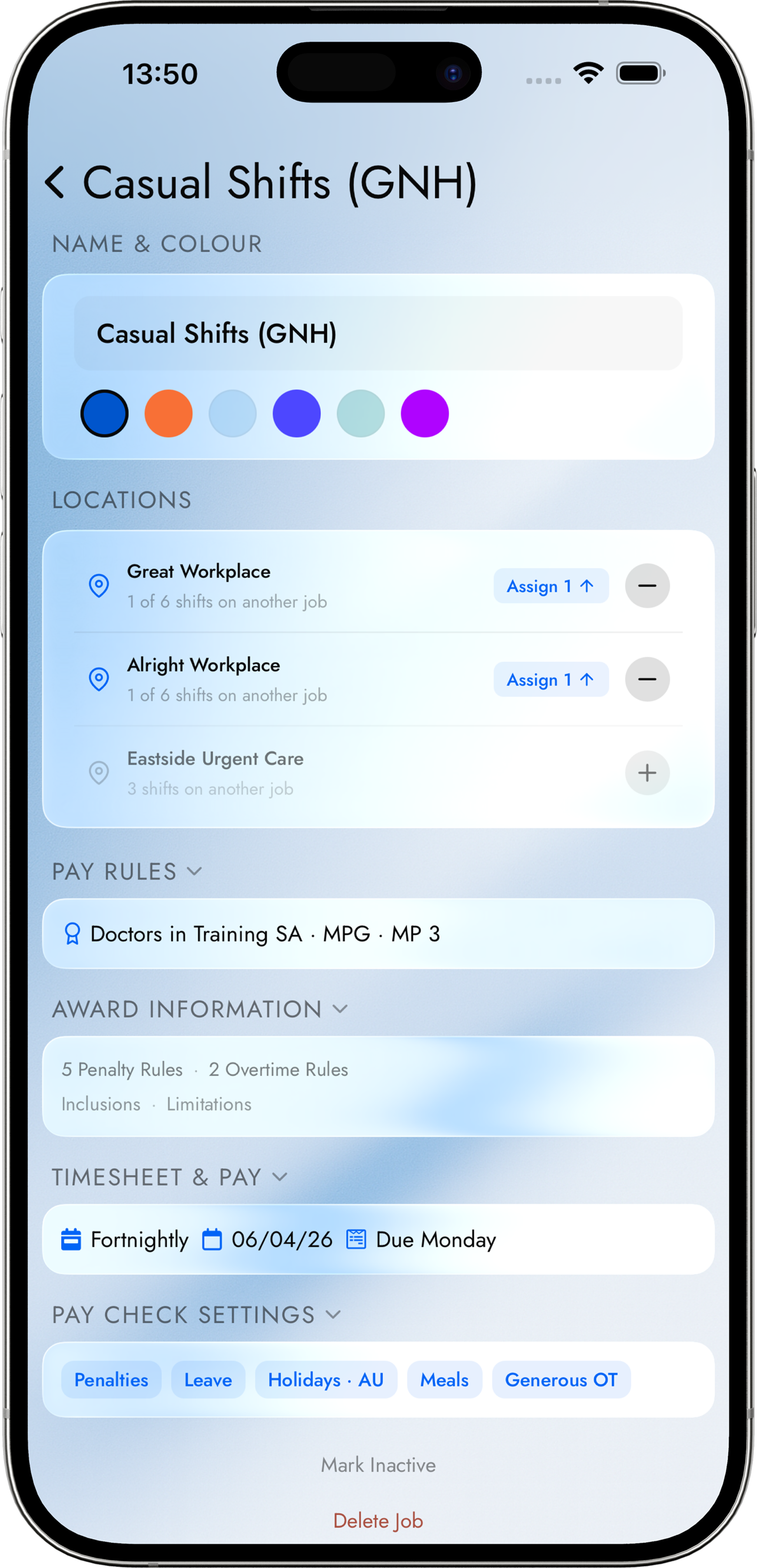
Each job in Shift It has its own:
- Award or enterprise agreement — Pay Check applies the correct penalty rate schedule for that specific job. A hospital job under MA000034 and an agency job under a different structure are calculated independently.
- Classification and pay point — your level and year at the hospital isn’t necessarily the same as at the agency.
- Pay period — fortnightly at the hospital, weekly at the agency. Pay Check produces a separate payslip comparison for each.
- Roster import — each employer’s spreadsheet is imported into its own job, so shifts are colour-coded by employer and never mixed up.
Your calendar shows all shifts across all jobs in a single view, with colour-coding by job. Coming Up shows all upcoming shifts together across jobs. Pay Day shows expected earnings for one job at a time — use the job selector to switch between jobs and their pay periods.
Why no other app offers this for Australian workers
The per-job award calculation is the part that competitors don’t have. An app that applies a flat hourly rate across all your jobs (Supershift, My Shift Planner) can add up your hours but can’t tell you whether your weekend rate at the hospital was correctly calculated, let alone compare that against what your agency should have paid you under a different set of rules.
Pay verification for multi-job shift workers requires maintaining independent records for each employment stream and checking each payslip against the correct award. Doing that manually, for multiple awards, across overlapping pay periods, is the kind of work that results in errors going unnoticed for months.
Common underpayment patterns in multi-job nursing
Casual loading not applied to penalty rates: At an agency or bank position, your casual loading should be applied first and penalty rates calculated on top of the loaded rate. The Sunday penalty at the hospital (175%) should be applied to the casual loaded rate, not to the base rate with the casual loading added separately.
Bank and pool shifts with no penalty rate awareness: Some hospital pools and banks treat all shifts as flat-rate casual regardless of day or time. If your pool agreement includes penalty rates, the absence of Saturday or Sunday rates on that payslip is an underpayment.
Agency gross vs actual entitlement: Agencies sometimes quote a flat gross per shift that is meant to capture all loadings. Whether that flat rate actually equals what the applicable award would produce — particularly for night shifts and public holidays — is worth checking against a calculated figure.
Getting set up in Shift It
The Jobs feature in Shift It Pro lets you create a separate job for each employer, assign it an award, set your classification and pay point, and import its roster independently. Each job gets its own colour on your calendar. Pay Check produces a separate expected pay figure for each job’s pay period so you can compare it against each payslip individually.
If you work under an award we don’t yet support, the custom pay rules option lets you configure a manual rate structure. We can also build the award directly — contact us with the details and we’ll assess it for a future update.
See the Pay Check page for how the per-shift calculation works, or the supported awards for the full list.
Know what you're owed.
Shift It checks your pay against your award automatically. Start free — upgrade when it catches its first mistake.