How to Check If Your Payslip Is Correct
A step-by-step guide to verifying your payslip against your award — what to look for, common errors, and what to do when something doesn't add up.
Most shift workers glance at their payslip total, check it roughly matches what they expected, and move on. That’s understandable — checking a payslip properly takes time and requires knowing your award. But payroll errors in shift work are common, they’re often systematic, and they compound across pay periods. Here’s how to actually check yours.
What a correct payslip needs to show
Under the Fair Work Act, your employer must provide a payslip within one working day of payment. A compliant payslip must include:
- Employer name and ABN
- Your name
- Pay period dates
- Gross and net pay
- Each payment component separately (base rate, penalty rates, allowances, overtime — as separate line items, not lumped together)
- Hours worked at each rate (if you’re paid by the hour)
- Any deductions itemised separately
- Super contributions and fund details
If your payslip shows one line for “ordinary hours” and a total figure without itemising penalty rates, that’s a problem. You cannot verify what you were paid without the breakdown.
Step 1: Check the hours
Compare the hours on your payslip against your own record of when you actually worked. This is where having an independent shift record matters — if you’re relying on your employer’s system to tell you both what you worked and what you were paid, you have no independent check.
Look for: shifts recorded as shorter than they were, start or finish times that don’t match, on-call hours not recorded, recalled shifts not appearing.
Step 2: Check the rates
Once the hours are confirmed, check that the right rate was applied to each block of time. This requires knowing your award. Common rate errors:
- Weekend rates: Saturday and Sunday attract penalty loadings under most awards. If your payslip shows Sunday hours at your ordinary rate, that’s wrong.
- Public holiday rates: most awards specify 250% or higher for public holiday work. Some employers apply standard weekend rates to public holidays instead.
- Night loadings: shifts that run into defined night periods (e.g. after 10 pm in hospitality, after midnight for nurses) should show the loading for those hours.
- Midnight crossovers: a shift that starts Saturday night and finishes Sunday morning should show two rates — Saturday rate to midnight, Sunday rate after. A single line at Saturday rates underpays the Sunday portion.
- Overtime: hours worked beyond your rostered shift should show at the overtime rate, not your ordinary rate.
Step 3: Check the allowances
Many awards include allowances that are frequently missed. Under SCHADS: broken shift allowance, sleepover allowance. Under the Hospitality Award: split shift allowance. Under the Nurses Awards: uniform allowance, on-call and recall payments. If your role involves these provisions and your payslip doesn’t show them, they may simply not have been paid.
Step 4: Check the super
Superannuation must be paid on ordinary time earnings. For shift workers, this includes penalty rates and shift loadings — not just your base rate. Under-reporting earnings (or treating penalty rates as excluded from super) is a common error. The current super rate is 12%.
What to do if something doesn’t add up
First, check your own records and your award or enterprise agreement. The Fair Work Commission publishes all Modern Awards at fairwork.gov.au. If the award confirms what you calculated, raise it with your payroll department in writing — a written record of your query is important if it escalates.
If you believe there’s been a genuine underpayment and payroll doesn’t resolve it, contact your union (if you’re a member) or the Fair Work Ombudsman. They handle underpayment complaints and can compel employers to back-pay. Limitation periods apply — you generally have six years to recover underpaid wages in most states, but acting earlier is better.
The easier approach
Manually checking every shift against every rate boundary is time-consuming. Pay Check in Shift It does this automatically: it applies your award to your exact shift times, calculates what you should have been paid, and compares it to the figure you enter from your payslip. If there’s a gap, you see it immediately, with the breakdown that explains why.
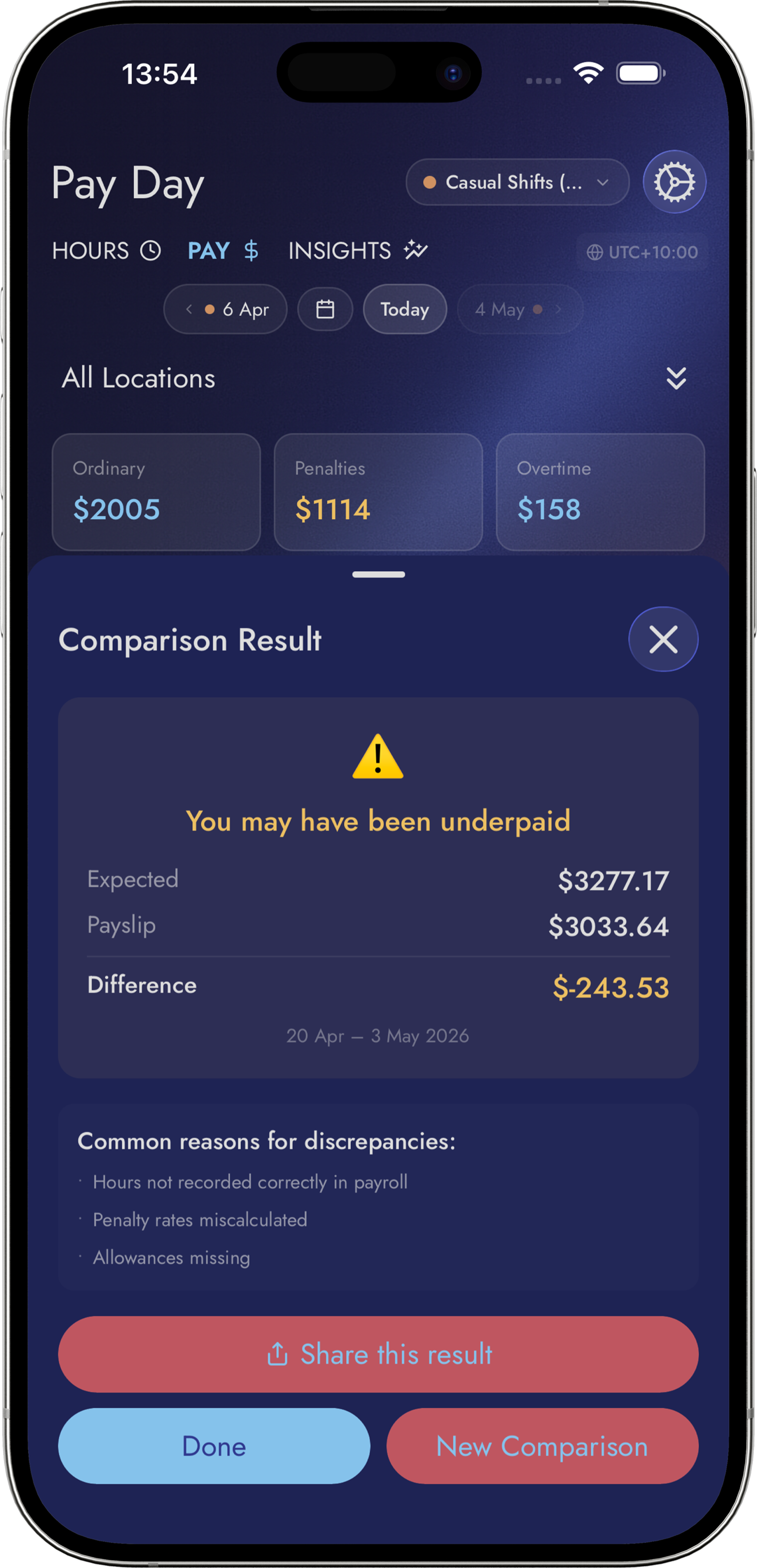
The workers who catch underpayment consistently aren’t auditing every payslip line by line. They have a system that does it for them and flags when something doesn’t match.
Know what you're owed.
Shift It checks your pay against your award automatically. Start free — upgrade when it catches its first mistake.